Shopping for a new laptop can feel like trying to read a foreign language. You walk into a store or open a website, and you are immediately bombarded with an alphabet soup of acronyms: CPU, GPU, RAM, SSD, HDD, and GHz.
Sales reps might try to upsell you on a $2,000 machine that you don’t actually need, while the $300 bargain bin laptop might become painfully slow within six months.
Buying a laptop doesn’t have to be intimidating. You just need to understand the three core components that actually dictate how a computer performs. In this 2026 buyer’s guide, we will strip away the marketing jargon and use simple analogies to help you find the exact laptop for your needs and budget.
The Big Three: CPU, RAM, and Storage
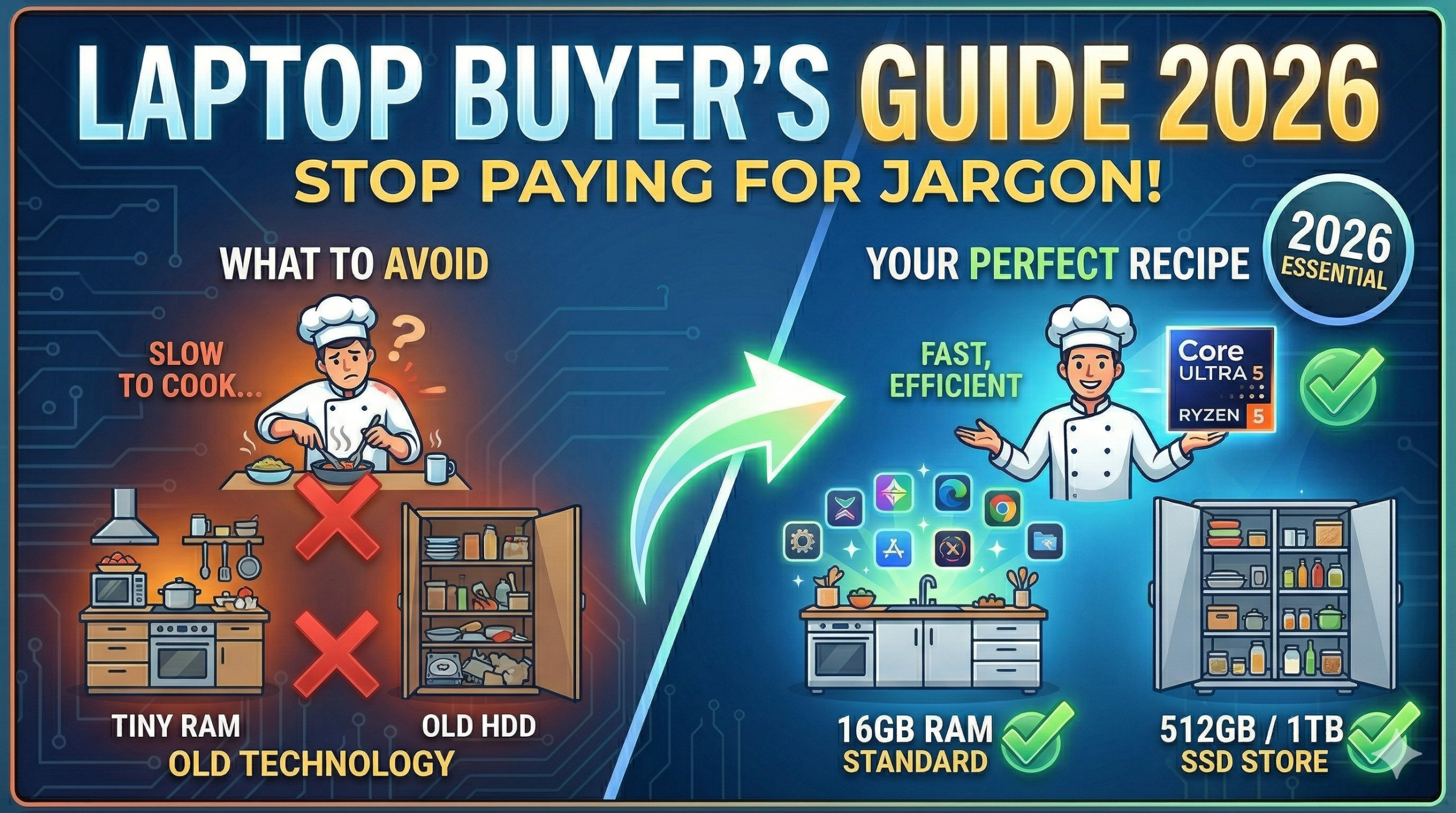
To understand how a computer works, imagine a kitchen. The components of your laptop dictate how fast and efficiently that kitchen can cook a meal.
1. The Processor (CPU): The Chef
The Central Processing Unit (CPU) is the brain of the computer. In our kitchen analogy, the CPU is the chef. A faster, more powerful chef can chop vegetables, stir the soup, and manage the oven all at the same time without getting overwhelmed.
When looking at processors, you will mostly see three brands: Intel, AMD, and Apple.
- Intel Core i3 / AMD Ryzen 3: The beginner chefs. Great for basic tasks like browsing the web, checking email, and watching YouTube.
- Intel Core i5 (or Core Ultra 5) / AMD Ryzen 5: The head chefs. This is the sweet spot for 90% of users. They can easily handle heavy multitasking, office work, large spreadsheets, and light photo editing.
- Intel Core i7/i9 / AMD Ryzen 7/9: The master executive chefs. You only need these if you are doing heavy video editing, 3D modeling, or high-end gaming.
- Apple Silicon (M2, M3, M4): If you are buying a Mac, Apple uses its own incredibly efficient “M-Series” chips. The base model (e.g., M3) is more than powerful enough for the average user, while the “Pro” and “Max” versions are strictly for heavy creative professionals.
2. RAM (Memory): The Kitchen Counter
Random Access Memory (RAM) is your computer’s short-term memory. Think of it as the kitchen counter space.
If you have a tiny counter (low RAM), the chef can only prepare one ingredient at a time. If you try to open 20 web browser tabs, Spotify, and a Word document all at once, the computer freezes because it ran out of counter space to hold everything.
- 4GB: Avoid at all costs in 2026. Your computer will struggle to run basic modern web browsers.
- 8GB: The bare minimum. Okay for very light, casual use, but it will start to show its limits quickly.
- 16GB (The 2026 Standard): This is what you should aim for. It provides plenty of “counter space” to have dozens of tabs open while running other software without a single hiccup.
- 32GB+: Only necessary for hardcore gamers, professional video editors, or software developers.
3. Storage: The Pantry
Storage is where all your files, photos, and apps live permanently. This is your kitchen pantry.
There are two main types of storage drives you will see advertised, but in 2026, there is only one you should ever buy:
- HDD (Hard Disk Drive): The old, spinning magnetic drives. They are cheap, but they are incredibly slow. Do not buy a laptop with an HDD as its main drive. It will make even a brand-new computer feel five years old out of the box.
- SSD (Solid State Drive): The modern standard. They have no moving parts and are up to 10x faster than HDDs. An SSD means your laptop boots up in seconds and apps open instantly. Always ensure the laptop specifies it has an SSD.
Pro Tip on Storage Size: 256GB of storage gets filled up very fast once you install a few apps and save some photos. Aim for 512GB of SSD storage to comfortably future-proof your machine, or 1TB if you download a lot of large video files.
Operating Systems: Mac, Windows, or ChromeOS?
The “kitchen” you choose determines what kind of tools you get to use.
- Windows (PC): The most versatile and widely used. Best for office work, gaming, and maximum compatibility with almost all software. There are laptops available at every price point.
- macOS (Apple MacBook): Known for premium build quality, incredible battery life, and high security. If you already own an iPhone and want everything to sync seamlessly, a MacBook Air is a fantastic (though pricier) investment.
- ChromeOS (Chromebook): Essentially a laptop that only runs a web browser and Android apps. If you strictly only do tasks on the internet (Google Docs, Netflix, web-based email), a $200-$300 Chromebook is a safe, virus-resistant, and cheap option.
The “Who Are You?” Cheat Sheet
Still unsure? Find the profile that matches your daily routine:
1. The Basic Browser & Binge-Watcher
You use your laptop to pay bills, shop online, watch Netflix, and check Facebook.
- Look for: Intel Core i3 / AMD Ryzen 3, 8GB of RAM, and a 256GB SSD. (Or a basic Chromebook).
2. The Everyday Multitasker & Office Worker
You constantly juggle 15+ browser tabs, use Microsoft Excel or Word heavily, jump on Zoom calls, and want the laptop to last for years without slowing down.
- Look for: Intel Core i5 / AMD Ryzen 5 (or Apple M2/M3), 16GB of RAM, and a 512GB SSD.
3. The Content Creator
You edit videos for YouTube or TikTok, use Adobe Photoshop heavily, or manage complex digital marketing campaigns requiring heavy software.
- Look for: Intel Core i7 / AMD Ryzen 7 (or Apple M-Series Pro), 16GB to 32GB of RAM, and a 1TB SSD. You will also want a machine with a dedicated Graphics Card (GPU) like an NVIDIA RTX.
The Bottom Line
You do not need to be a tech expert to buy a great laptop; you just need to check the spec sheet for the right recipe. For the vast majority of people buying a computer in 2026, the golden rule to remember is: Core i5 (or Ryzen 5), 16GB of RAM, and a 512GB SSD. Stick to that formula, and you will have a blazing-fast machine that will happily serve you for years to come.
Leave a Reply